Device-Based App Preview
Show the real app screen inside an iPhone or Android device presentation so reviewers can see the product in a more realistic visual context.

Turn real app screens into polished visual previews for clients, websites, app stores, launch pages, presentations and product reviews. Create a reusable preview direction with device presentation, editable copy, custom backgrounds and high-quality export.
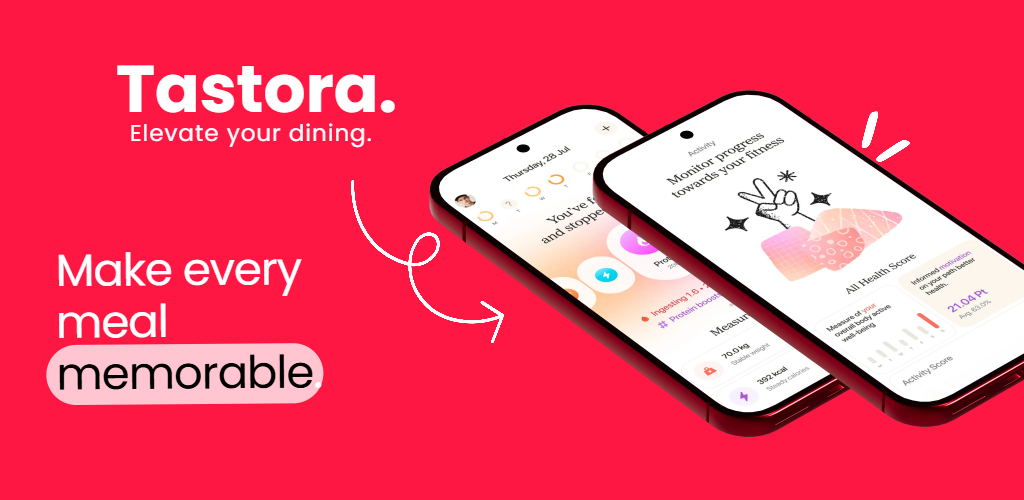
A visual app preview can sit between a raw screenshot and a full marketing campaign. It gives the product enough structure for someone to understand the interface, review the concept or present the app professionally.
Show the real app screen inside an iPhone or Android device presentation so reviewers can see the product in a more realistic visual context.
Keep the interface large and readable so the preview helps someone understand the actual product instead of focusing only on decoration.
Add a short feature title, status note or benefit message when the preview needs context for a client, stakeholder or launch audience.
Use a simple brand color, gradient or image so the preview feels finished while the product screen remains the main visual.
Center the device, place it beside supporting copy or create a wider composition depending on whether the preview is for review, presentation or marketing.
Export polished static app previews for websites, store pages, presentations, client reviews and launch preparation.
Start with the exact product screen you want someone to review, then add only the visual structure needed to make the preview easier to understand.
Choose the product state, feature or workflow that needs to be reviewed, approved, presented or showcased.
Use a device frame, a minimal product-focused layout or a wider branded composition depending on where the preview will appear.
Use a short headline or feature label if the viewer needs help understanding what the screen is demonstrating.
Use the finished preview for client review, presentations, websites or launch preparation and reuse the same style for additional app screens.
App previews are useful whenever someone needs to see the product clearly before or outside the final store marketing campaign.
The same preview style can support multiple stages of the product workflow as long as the interface and message stay specific to the audience.
Present a mobile screen inside a cleaner visual frame when a client needs to review the direction without opening the full app build.
Show a product state, upcoming feature or launch screen in a clear presentation format for internal review or approval.
Use a polished device visual inside a landing page or feature section to help visitors understand the app before they download it.
Turn the same product screen into a more structured visual before adapting it into the final App Store or Google Play screenshot campaign.
Use polished app visuals inside launch decks, demos or announcement materials where raw screenshots would feel unfinished.
Present mobile UI work in a cleaner visual context when documenting an app project, case study or design portfolio.
A preview focuses on showing the product clearly, a mockup emphasizes device presentation, and a store screenshot combines the product with a stronger marketing sequence.
| Visual Type | Main Purpose | Best For |
|---|---|---|
| App preview | Clear product showcase | Review, presentation, approval and pre-launch work |
| App mockup | Device-focused presentation | Websites, portfolios and promotional scenes |
| Store screenshot | Benefit-led listing creative | App Store and Google Play campaigns |
| Promo image | Campaign promotion | Launches, websites and social media |
| 3D device visual | Dimensional impact | Hero graphics and high-impact marketing assets |
Use this page for broad static app previews, then move to a more specific screenshot, mockup or promotion workflow when the project requires it.
Create device-focused iPhone and Android app previews for websites, stores, launches and presentations.
Create mobile mockups →Create App Store and Google Play screenshot campaigns with reusable layouts and device presentation.
Create app screenshots →Create launch, website and social promotional graphics around your app screen and brand identity.
Create app promo images →Create device-first product visuals for mobile apps, websites, portfolios and marketing campaigns.
Create phone mockups →Create dimensional product visuals when the preview needs stronger depth and device perspective.
Create 3D app visuals →Create app store graphics directly in your browser with editable layouts and product screens.
Create screenshots online →Common questions from developers, designers, agencies and founders creating visual app previews for iPhone and Android.
An app preview generator helps turn raw app screens into polished static visual previews using device presentation, layout, optional text and custom backgrounds.
This page is focused on static visual app preview images and product presentation graphics rather than video-based App Preview production.
Yes. RenderDuck supports visual app presentation workflows for iPhone and Android products.
Yes. Static app previews are useful for showing a mobile UI direction in a cleaner context before a client or stakeholder reviews the full product.
Yes. App preview images work well inside landing pages, feature sections and launch pages where visitors need to understand the product visually.
Yes. Device frames can help give the product more context as long as the app interface remains large and easy to inspect.
Yes. You can use background styling and optional labels or headlines when the preview needs additional context.
Yes. Reusing the same device treatment, background and spacing can create a consistent set of product previews for review, presentation or marketing.
RenderDuck is designed to provide clean standard app marketing exports without placing a RenderDuck watermark over the finished graphic.
Add your app screen, choose the device presentation, customize the layout and export a polished static visual preview directly from your browser.
Start Creating App Previews