Launch-Ready Promo Graphics
Create a strong visual for a new app launch, feature announcement or product update using the real interface as the hero.

Turn real app screens into branded promotional graphics for launch campaigns, landing pages, social posts, store marketing and product announcements. Combine device mockups, editable headlines and custom backgrounds to build one reusable visual direction across your app promotion.
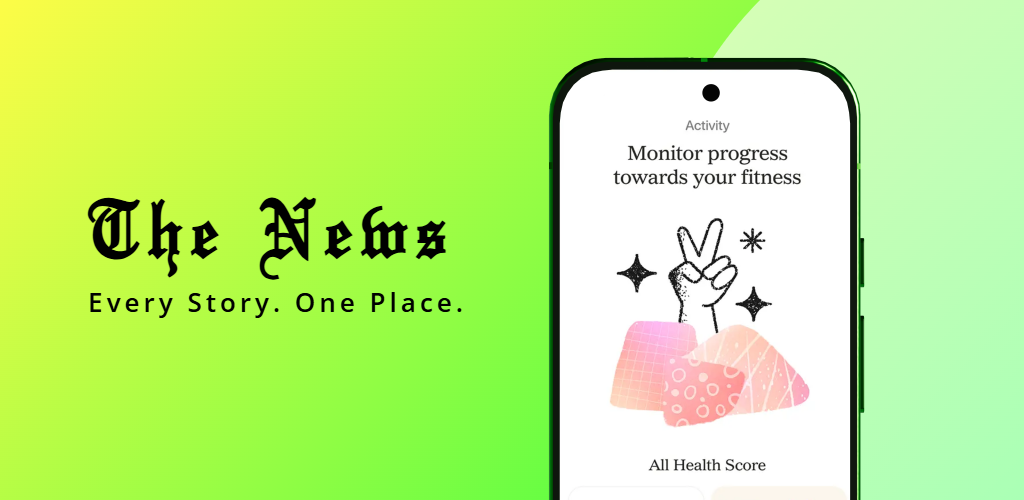
App promo images work best when the product remains recognizable. Use the interface, device presentation and short marketing copy together so the creative looks polished without hiding what the app actually does.
Create a strong visual for a new app launch, feature announcement or product update using the real interface as the hero.
Use phone or tablet framing when it helps the audience recognize the product and gives the app screen a cleaner marketing presentation.
Add a short campaign message around the app benefit, launch announcement or product promise instead of leaving the visual unexplained.
Use colors, gradients or images that fit your launch identity while keeping enough contrast around the device and headline.
Keep typography, device treatment and background styling consistent as you adapt the same app promotion direction to different channels.
Export polished promotional graphics for launch pages, social campaigns, product announcements and wider app marketing use.
Start with the campaign goal, choose the product evidence and then build the promotional composition around one clear message.
Decide whether the image is for a launch, feature release, website hero, store promotion or social announcement.
Select the product UI that best supports the message and keep the important part of the interface large enough to understand.
Adjust the device presentation, headline, spacing and background so the app remains the focal point of the creative.
Reuse the visual system for additional campaign assets instead of creating a completely different style for every promotion channel.
A strong promotional visual can support several marketing touchpoints when the core device scene and product message are designed to be reusable.
The best app promo image depends on where it will appear and what the audience needs to understand first.
Introduce the app with a strong device visual and one clear product promise that can anchor the rest of the launch campaign.
Use a device mockup and open space for supporting copy so the promo image works naturally inside a landing-page hero section.
Highlight the new interface screen and pair it with a focused benefit message so users understand what changed and why it matters.
Simplify the composition for faster scanning while keeping the app screen, message and brand identity easy to recognize.
Adapt the device scene to support a store marketing campaign while keeping the product visual consistent with the main screenshot set.
Use polished app promo visuals to explain the product inside pitch decks, demos or presentation materials without showing raw UI captures.
One app can use the same visual identity across several channels, but the amount of copy, interface detail and open space should change with the placement.
| Promotion Channel | Recommended Focus | Useful Adjustment |
|---|---|---|
| Launch page | Hero product outcome | Leave room for supporting website copy |
| Social post | One clear message | Reduce text and simplify the composition |
| Feature announcement | New feature + real UI | Make the updated screen the visual focus |
| Store promotion | Product benefit | Keep the creative consistent with the store listing |
| Presentation | Product clarity | Use larger app UI and less decorative detail |
Use this page when the goal is a broad promotional image, then move to a more specific screenshot, social or mockup workflow when the campaign requires it.
Create benefit-led app marketing screenshots for stores, websites and launch campaigns.
Create marketing screenshots →Create reusable App Store and Google Play screenshot campaigns with device mockups and editable layouts.
Open app screenshot generator →Adapt app product visuals into promotional graphics for social media campaigns.
Create app social posts →Create device-focused product visuals for websites, launch pages and app promotion.
Create phone mockups →Create dimensional phone scenes when a campaign needs stronger depth and visual movement.
Create 3D phone mockups →Create a structured store screenshot sequence for App Store and Google Play.
Create listing screenshots →Common questions from developers, founders and marketers creating promotional app graphics for launches and campaigns.
An app promo image is a marketing graphic that combines the real app interface with a headline, device presentation and brand styling to promote the product in a launch, website, store or social campaign.
Yes. You can build a branded promotional image around your app screen and reuse the same visual direction for different launch assets.
Yes. App promo images work well in landing-page hero sections, product feature areas and launch pages when the device and headline are composed for the available space.
Yes. The same device scene and brand styling can be adapted into simpler social layouts with shorter copy and a stronger single-message focus.
Yes. Phone mockups can help make the product easier to recognize and give the app screen a cleaner promotional presentation.
Yes. The app promo workflow is designed around editable text, device presentation and background styling so the final creative can match your product identity.
Yes. Reusing the same visual identity across launches, website graphics and social promotion can make the app easier to recognize while reducing repeated design work.
Yes. RenderDuck also supports 3D phone presentation when the promo image needs more depth and dimensional impact.
RenderDuck is designed to provide clean standard app marketing exports without placing a RenderDuck watermark over the finished graphic.
Add your app screen, customize the device scene and message, and export a polished promotional graphic for your launch, website or campaign.
Start Creating App Promo Images